


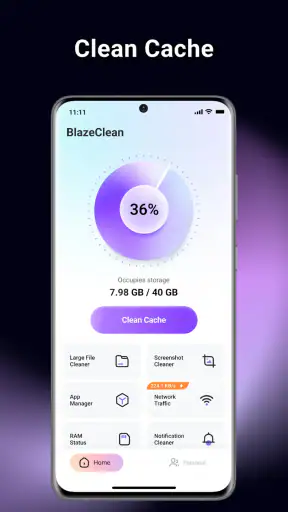
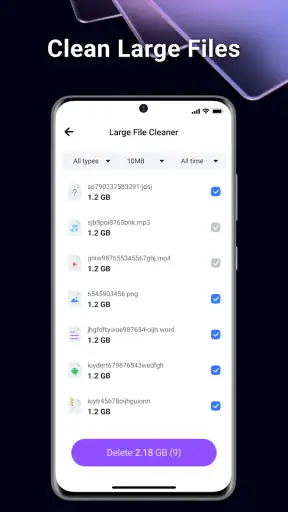
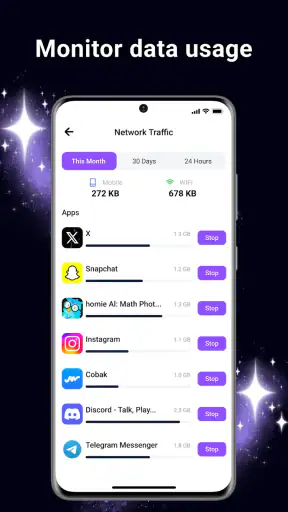
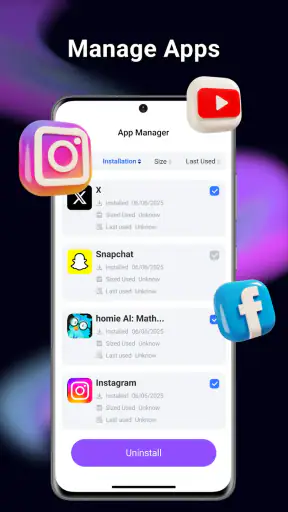
I installed BlazeClean because storage problems rarely arrive at a convenient moment. On a shared phone or a device used by several people in the household, the warning may appear just before taking photos, downloading a school file, or updating an important app. This free tools app from Alsaeed is built around that practical problem: finding unnecessary files, making room, and bringing some order to a crowded app list.
My first impression was that BlazeClean is easier to understand than many all-in-one maintenance apps. Its purpose is direct rather than glamorous. It is not trying to replace a file manager, cloud service, or backup system. Instead, it gives everyday users a focused place to look at storage and decide what can be removed. That narrow purpose is its main strength, especially when the person managing the phone does not want to learn a complicated cleanup workflow.
The app is free, rated for Everyone, and available for devices running Android 7.0 or later. Its current version is V1.0.6, and it has reached over 5 million installs with an average rating of 4.4 from around 9 thousand ratings. Those figures suggest that it has found a broad audience, but I still recommend treating any cleanup suggestion as something to review rather than something to accept automatically.
How BlazeClean fits a shared household phone
A shared device creates a different storage problem from a personal phone. One person may save videos, another may install games, and someone else may use the camera for documents or family events. The result is often a mixture of files that look disposable to one user but matter to another. In that setting, the most useful feature of a cleaner is not speed; it is giving everyone a chance to understand what is being considered for removal.
I would use BlazeClean before a household cleanup conversation, not as a silent background habit. For example, imagine a phone used by a parent and two teenagers. The parent notices that there is no room for a work attachment. Rather than deleting large folders at random, the family can open the storage view together, identify old downloads, and ask who owns the files before removing anything. That small pause prevents the common mistake of treating “old” as “unimportant.”
The same approach works for a tablet passed between adults and children. A child may have installed several apps for a short project, while an adult may have accumulated duplicate documents. BlazeClean can help reveal that clutter in one place, but the final decision still belongs to the person who understands the file. I see it as a conversation aid for shared storage, not as a substitute for household coordination.
The safest cleanup is a reviewed cleanup. That matters more on a shared device because a single deletion can affect several people. Before confirming any removal, I would check the file name, location, and likely owner. If a photo, document, recording, or downloaded lesson might be needed later, I would move or back it up using a separate method first. BlazeClean makes the cleanup stage more approachable, but it cannot know the personal meaning of every file.
Starting with clear boundaries
When I first approach a storage tool, I prefer to define the problem before touching anything. Is the phone full because of media, unused applications, temporary clutter, or a large collection of downloads? BlazeClean is most useful when I use it to answer that question rather than pressing through every available cleanup action without a plan.
For a shared phone, I would establish three simple boundaries. First, nobody deletes another person’s personal material without asking. Second, family photos and school or work documents receive a second look. Third, app removal is discussed separately from file cleanup. These rules are not app features, but they make the app safer and more useful in real life.
That separation is important because an unused app and an unwanted file are not the same thing. An app may be rarely opened but still needed during travel, study, or an occasional work task. Conversely, a download may be completely disposable even though the related app is still valuable. I found that thinking in these two categories helps avoid the all-or-nothing behavior that makes some cleaning sessions frustrating.
BlazeClean also makes sense as part of a short routine rather than an emergency rescue. If storage is checked only when the phone refuses a download, the cleanup becomes rushed. A calmer session lets each household member identify their own material and prevents one person from making assumptions about another person’s files. I would rather spend a few minutes reviewing categories than recover from an accidental deletion later.
There is also a useful distinction between freeing space and organizing a device. Removing clutter may create room, but it does not automatically create a sensible naming system, album structure, or backup strategy. BlazeClean can support the first task. I would use a file manager, photo organizer, or cloud storage service for the second when the household needs long-term order.
Coordinating cleanup without stepping over account boundaries
Shared use becomes complicated when different accounts, profiles, or app logins are involved. A storage tool can show that something occupies space, but that does not mean every user has equal authority to remove it. A game may belong to one person, a messaging app may contain another person’s local material, and a work application may be tied to an account that should not be disturbed casually.
My preferred workflow is to let the device owner begin the scan, then invite the relevant user to approve anything personal. If the phone is used by children, I would ask them to identify their own photos, downloads, and applications before any cleanup. If the device belongs to an adult but is temporarily shared, I would be even more cautious because temporary access should not become permission to reorganize someone else’s storage.
This is where BlazeClean’s straightforward focus is both helpful and limited. It can put storage management in front of the household, but coordination still happens outside the app. I would not choose it expecting a complete family administration system, shared approval workflow, or automatic separation of everyone’s data. Those needs are better handled through separate device profiles, operating-system account tools, or a clearly agreed household routine.
A practical trick is to clean one person’s area at a time. Start with the user who needs the space most urgently, then review shared folders, and leave uncertain items until everyone is available. This avoids turning the session into a race. It also makes it easier to notice whether the real issue is a single large collection rather than general device neglect.
I would also avoid using a cleaner immediately after someone has downloaded important material. A new video, map, document, or offline lesson may look unnecessary to another person even though it was saved deliberately. Waiting until the owner has finished using it is a simple way to reduce conflict. The app is more effective when it supports a known routine instead of interrupting one.
Age, trust, and the meaning of an Everyone rating
BlazeClean carries an Everyone content rating, which makes its subject matter suitable for a broad audience. That does not mean every cleanup decision should be handed to a young child without supervision. Storage management involves personal photos, messages, downloads, and applications, so the important issue is not only whether the interface is age-appropriate. It is whether the user understands ownership and consequences.
For an older child who regularly manages a tablet, I could see BlazeClean being a useful way to teach digital housekeeping. I would demonstrate the difference between a temporary file, a downloaded item, and an installed application, then let the child identify what they recognize. I would keep final approval with an adult until the child has shown that they can distinguish personal files from disposable clutter.
For younger children, I would use the app together rather than leaving them to explore it alone. The lesson should be about asking before deleting, not about maximizing the amount of space freed. That distinction builds trust. A child who learns that cleanup means destroying anything unfamiliar may become afraid to manage storage later, while a child who learns to inspect and ask questions gains a useful habit.
Adults should follow the same standard with one another. A partner, roommate, or relative may share the phone without sharing every account or file. The presence of a cleanup tool does not remove the need for privacy. I would never use a storage review as an excuse to browse someone else’s personal content, and I would keep the session focused on the specific space problem.
Because BlazeClean is free, it is easy to suggest as a household utility without adding a purchase decision to the conversation. That is convenient, particularly for a family managing several older devices. Still, free access does not make every recommendation appropriate. I would judge the app by whether it helps the household make informed choices, not by how aggressively it reports items that might be removed.
Where it beats ordinary alternatives—and where it does not
The usual alternative is the storage screen already built into Android. That option remains valuable because it is close to the operating system and often gives a reliable high-level view of what occupies space. If I only need to check whether videos, applications, or downloads are responsible for a shortage, the built-in screen may be enough and may require no additional app.
BlazeClean becomes more appealing when I want a dedicated place to revisit cleanup and app organization. Its identity as a focused tool makes the task feel less scattered than moving between several system menus. For someone helping a relative or coordinating a shared device, that focused presentation can make the conversation easier to follow.
On the other hand, a full file manager is usually better when I need precise control over folders, filenames, transfers, or external storage. A cloud service is better when the real goal is keeping family photos available across devices. A backup application is better when the priority is protecting data before deletion. BlazeClean should not be mistaken for any of those alternatives.
I also would not install it simply because a phone feels slow. Storage clutter can contribute to a messy device experience, but performance problems may come from battery health, a failing component, a problematic application, or an operating-system issue. A cleaner can help with organization and space; it is not a universal repair tool. This is one of the most important limits to keep in mind before expecting dramatic changes.
Another trade-off is convenience versus control. A specialized cleaner may reduce the effort needed to find candidates for removal, while manual browsing gives me a clearer understanding of exactly what I am touching. On a personal phone with little sensitive material, convenience may win. On a shared device containing schoolwork, private conversations, and family media, I prefer slower review and stronger human oversight.
Everyday workflows that make the app more useful
My favorite household workflow starts before a trip. Travel often produces maps, videos, photos, and downloaded documents, so I would review the device while there is still enough free space to work comfortably. I would remove clearly obsolete downloads, ask each user about large personal items, and leave anything uncertain until it can be checked. This is more reliable than waiting until the phone is full at the airport or on the road.
A second workflow is the end-of-school-term cleanup on a shared tablet. I would ask the student to separate completed material from anything needed for reference, then review unused educational applications separately. The benefit is not just recovered space. It also gives the student practice recognizing which digital items are temporary and which deserve retention.
A third use is preparing a family phone for a new user. I would not treat BlazeClean as a privacy eraser, because removing visible clutter is not the same as securely transferring ownership. Instead, I would use it only after accounts, backups, and personal data had been handled through the appropriate device settings and services. In that situation, its role is final organization, not the main handover procedure.
For day-to-day maintenance, I would keep a short note of what was removed during a household session. That may sound excessive, but it helps when someone later asks where a file went. It also reveals patterns: perhaps one application repeatedly creates large downloads, or perhaps the real problem is that several people save the same media. Once the pattern is known, changing the household habit may be more effective than repeating cleanup.
One non-obvious advantage of this approach is that it turns storage management into a diagnostic exercise. If removing obvious clutter barely changes the situation, that is a signal to investigate larger categories or individual applications rather than continuing to delete small items. If the phone fills again quickly, the issue may be ongoing downloads or media behavior. BlazeClean can start that investigation, but the household still needs to interpret the result.
Who should install it, and who should skip it
I think BlazeClean is a good fit for Android users who want a simple, dedicated way to approach crowded storage, especially people helping relatives or managing a device shared within a household. It is also suitable for someone who prefers a guided cleanup conversation over searching through folders manually. The Everyone rating and broad Android compatibility make it approachable for mixed-age households, provided an adult sets sensible boundaries.
I would skip it if the device already has plenty of space and the built-in storage tools meet every need. Adding another utility is not automatically an improvement. I would also look elsewhere if I needed detailed file operations, dependable backup, secure device wiping, cross-device photo access, or strict separation between multiple users. Those jobs call for more specialized tools and procedures.
People who expect a single tap to make an old phone feel new may also be disappointed. My experience with storage tools is that the best results come from identifying the actual source of clutter and making deliberate choices. BlazeClean can make that process less intimidating, but it cannot decide what a family values, repair bad hardware, or replace a backup plan.
Before using it on a device with important material, I would make sure essential photos and documents exist somewhere safe. I would then begin with items everyone agrees are disposable and only later consider less obvious categories. That order keeps the first session low-risk and gives users confidence in the process.
My household verdict
After using BlazeClean as a practical storage assistant, I see its strongest role in households where several people contribute to the same device’s clutter. It gives the cleanup task a clear starting point and can make an uncomfortable storage warning feel manageable. The app is not a replacement for Android’s own settings, a file manager, or a backup service, but it can be a convenient layer for people who want a more focused routine.
My recommendation is positive with one condition: use it as a review tool, not an automatic permission slip. Ask who owns a file, separate app decisions from file decisions, and protect anything that matters before removing it. That approach respects account boundaries and makes the Everyone rating meaningful in practice rather than treating age suitability as proof that every action is risk-free.
For a free app in the tools category, BlazeClean offers a sensible answer to a common household annoyance. Its value is highest when the goal is cooperation: one person identifies the storage problem, the relevant users confirm what can go, and the device ends up easier to manage. If that matches your situation, I would give it a try. If you need deep control, privacy migration, or backup protection, I would pair it with more specialized options instead of asking it to do everything.


